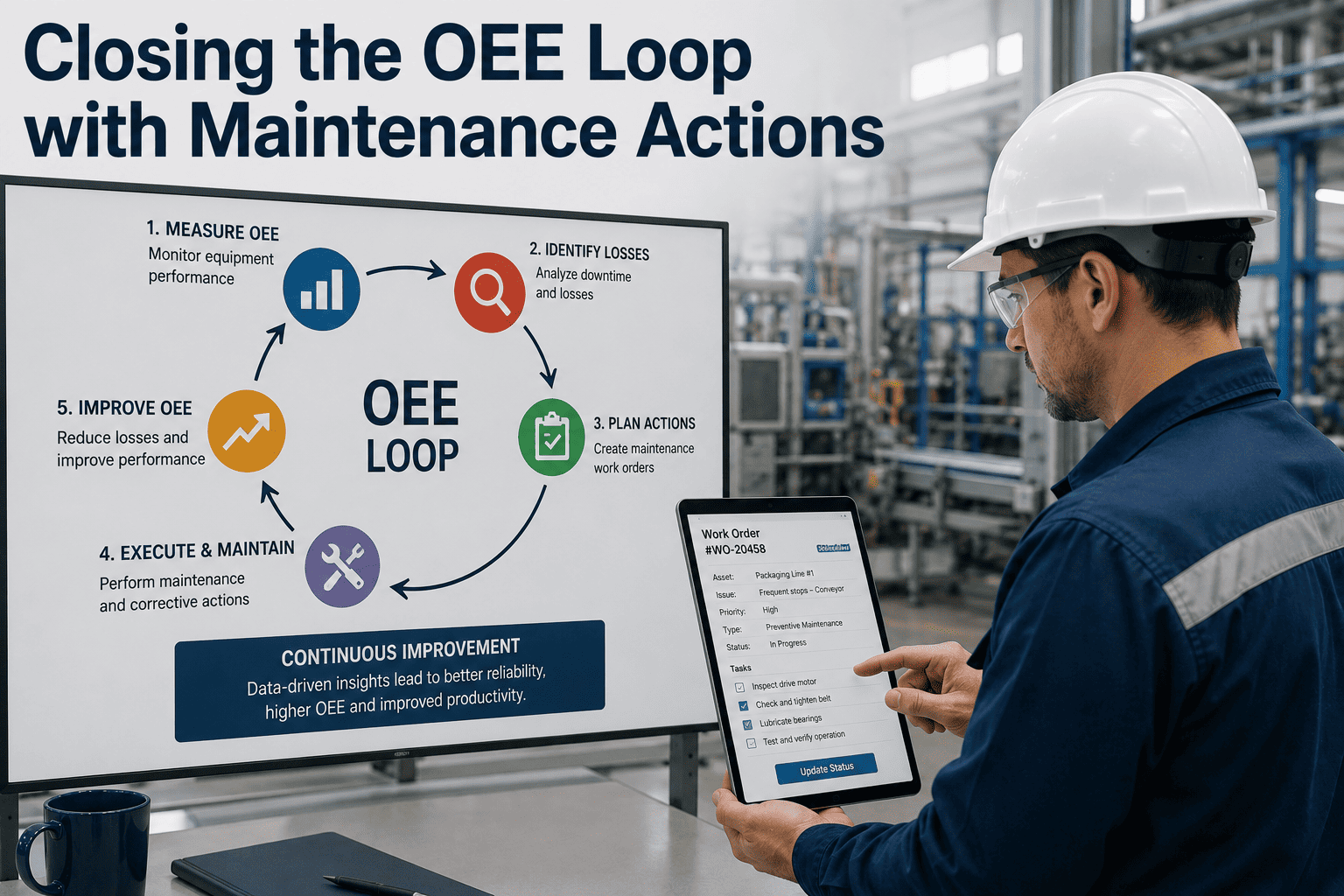
A dashboard that shows OEE dropping to 61% every Tuesday afternoon and does nothing else is theatre. The number is accurate, the chart is color-coded, and nothing on the floor changes. Closing the loop means every availability loss becomes a work order, every recurring defect becomes a PM revision, and every fix gets checked against the OEE number that flagged it in the first place. Reliability teams that do this consistently gain 3 to 5 OEE points per improvement cycle. Teams that only measure gain a prettier report.
Turn OEE Losses Into Work Orders Automatically
Every detected loss routes straight to the right technician with asset history attached — no manual handoff between OEE dashboard and CMMS.
The Six Big Losses, In Maintenance Language
Every OEE loss traces back to one of six categories, and each one has a specific maintenance response. Naming the loss is the easy part — the loop closes when the loss automatically becomes an assigned task.
| Loss Category | OEE Factor | Maintenance Action |
|---|---|---|
| Equipment failure | Availability | Priority work order, root cause logged against MTBF |
| Setup & changeover | Availability | SMED review, standardised changeover procedure |
| Idling & minor stops | Performance | Inspection task for jams, sensors, misalignment |
| Reduced speed | Performance | Condition check — lubrication, wear, calibration |
| Startup defects | Quality | Warm-up procedure review, changeover PM revision |
| Process defects | Quality | Calibration work order, tooling inspection |
From Loss Detected To Loop Closed
Detect
A stop, a slow cycle, or a reject is captured the moment it happens, not reconstructed at shift end.
Categorise
The loss is tagged against Availability, Performance, or Quality and matched to a Six Big Losses category.
Trigger
A work order is raised automatically, routed to the right technician with the asset's history attached.
Verify
OEE is checked after the fix to confirm the loss actually shrank, closing the loop back to the original number.
Why This Matters More Than The Score Itself
Measuring vs. Closing The Loop
Loss Is Logged
A downtime reason gets typed into a report. It sits in a spreadsheet until someone reviews it weeks later, if ever.
Loss Becomes A Task
The same downtime reason automatically opens a work order, assigned to a technician before the shift ends.
PM Plans Stay Static
Preventive maintenance runs on a fixed calendar regardless of what the loss data is actually showing that month.
PM Plans Get Revised
Recurring loss patterns feed back into the PM schedule, tightening intervals on assets that keep failing.
Stop Logging Losses. Start Closing Them.
Connect OEE loss detection directly to work order creation and PM revision — one system instead of a dashboard and a separate CMMS.
What A Closed Loop Looks Like In Practice
Automatic Work Order Creation
Breakdowns and threshold breaches raise a prioritised work order the moment they're detected, not at end of shift.
Loss Pareto By Asset
Losses are ranked by time impact per line and per asset, so the top two or three causes are obvious, not buried.
MTBF & MTTR Tracking
Every closed work order feeds reliability metrics automatically, sharpening the next PM interval decision.
Post-Fix OEE Verification
OEE on the affected asset is tracked after the repair to confirm the loss category actually shrank.
A loss tree only earns its place on the wall if it changes what a technician does next. Sign up free to see availability losses become work orders in the same system, instead of a chart in one tool and a ticket in another.
Frequently Asked Questions
What does "closing the OEE loop" actually mean?
It means every loss identified in OEE data automatically produces a maintenance action — a work order, a PM revision, or a root cause investigation — rather than sitting in a report.
Which OEE loss should reliability teams tackle first?
Sort losses by total time impact over a rolling four-week window and attack the top two or three categories, since they typically account for 70 to 80% of total loss.
How does OEE data improve a PM schedule?
Recurring failure patterns on the same asset point to a PM interval that's too loose; tightening it on the specific failure mode, rather than the whole schedule, closes the gap without over-maintaining.
Can minor stops really justify a maintenance work order?
Individually no, but a pattern of the same minor stop across many shifts is a chronic issue — jams, misalignment, or sensor faults — and that pattern is exactly what should trigger an inspection task.
How do we know a maintenance action actually fixed the OEE loss?
Track the specific loss category on that asset after the work order closes; a genuine fix shows up as a sustained drop in that loss, not just a quieter week.
Ready To Close The Loop On Your Plant's OEE
Loss detection, work order creation, and PM revision in one platform — so reliability action keeps pace with the data.







