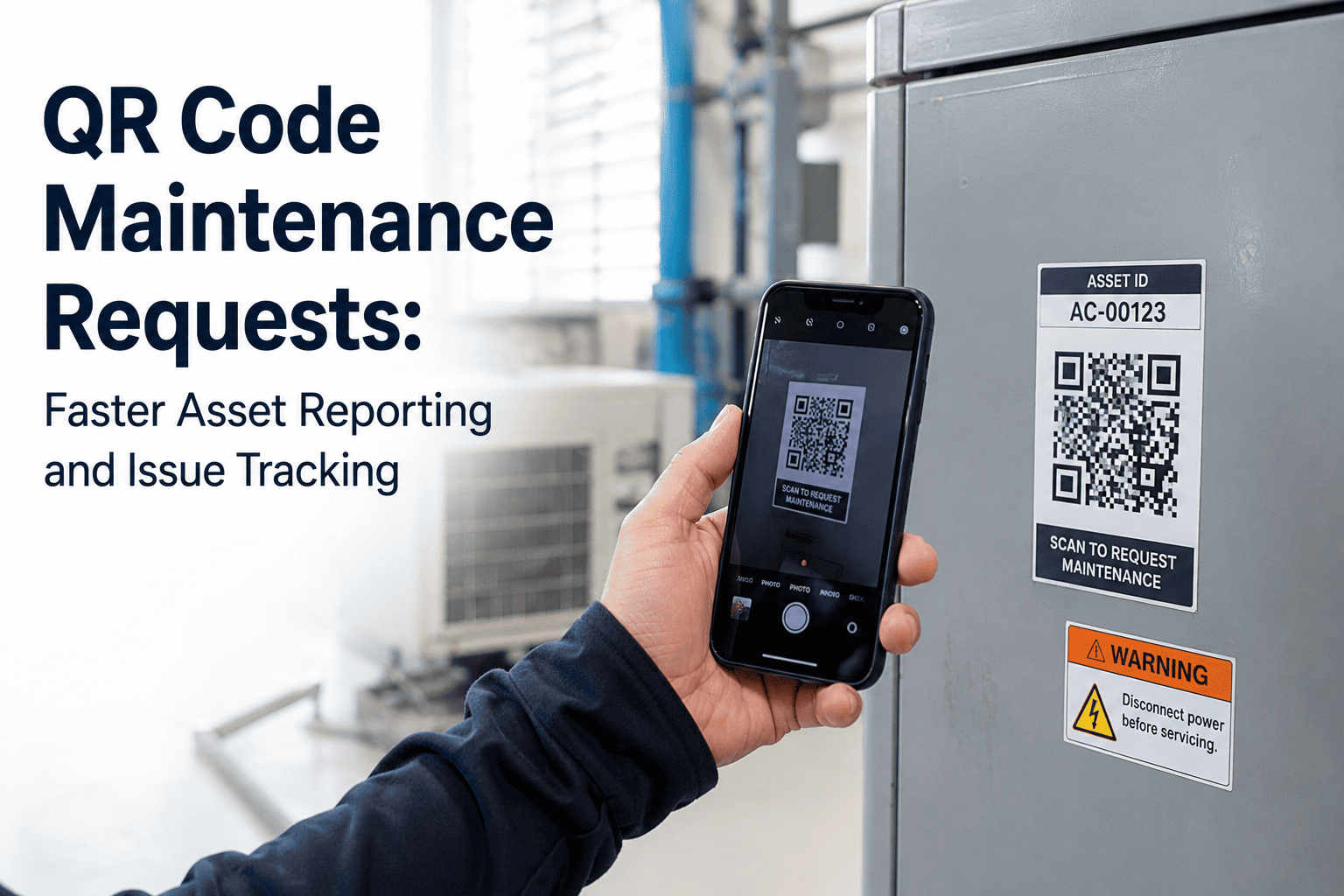
A technician spots a leaking pump. In the old workflow: walk back to the office, find the asset ID in a spreadsheet, open the maintenance system, manually enter the fault, guess at the location code, and submit. In a QR code workflow: point a phone at the label on the pump, tap three fields, done. A fully contextualised work order — with asset ID, location, fault category, photo, and full maintenance history — lands in the CMMS in under 30 seconds. No paperwork. No guesswork. No radio calls lost at shift change. Start a free trial to generate QR codes for every asset in your facility and start receiving structured, data-rich maintenance requests today.
What Happens in a Single QR Code Scan
Scan
Phone camera reads the label on the physical asset
Identify
Asset ID, location, specs, and full history load instantly
Report
Fault type, description, and photo captured on the spot
Submit
Work order created and routed in CMMS within 3 seconds
Track
Timestamped, geo-tagged record added to asset history automatically
<30s
From fault spotted to work order in CMMS — versus 8–15 minutes using manual paper or phone-based reporting
40%
Of equipment issues missed by manual inspection rounds — caught when QR-enabled reporting opens to the entire workforce
18–25%
Premium on emergency spare parts vs planned procurement — faster fault reporting converts emergency to planned spend
2.9B
QR code users globally in 2025 — your entire workforce already knows how to use the reporting method
The Old Way vs The QR Code Way
✗
Technician must identify asset ID from memory or a printed register — often wrong or missing
✗
Walk back to office or call coordinator to raise the work order — 8 to 15 minutes lost per report
✗
Fault description is vague — "pump making noise" with no fault category, no photo, no location reference
✗
Only trained maintenance staff raise requests — small faults go unreported until they become failures
✗
No link to asset history — technician dispatched without knowing last service date, open work orders, or previous faults
✗
Audit trail built retrospectively from paper — incomplete, disputed, and unusable for compliance
✓
Asset identified instantly by scanning the label — correct ID, location, and specification loaded automatically
✓
Work order raised at the asset location in under 30 seconds — no walk-back, no phone call required
✓
Structured form captures fault category, description, and photo — 5 to 10 times more data than a verbal report
✓
Anyone with a smartphone can report — operators, contractors, and building occupants all become early-fault detectors
✓
Technician dispatched with full asset history — last service, open work orders, failure codes, schematics — no separate lookup
✓
Timestamped, geo-tagged, photo-documented record created automatically — ISO 55001 and compliance-ready from day one
What a QR Code Tag Stores — and What It Unlocks
A QR code label is not just an identifier. It is a live link between the physical asset and its complete digital profile in your CMMS. The scan does not just open a form — it opens everything the reporting person and the attending technician needs to act without a single additional lookup.
Asset ID, name, make, model, serial number, installation date, and current location. No manual entry, no lookup in a separate register. The QR code is the asset record, accessed at the point of the physical asset.
Every prior work order, repair date, parts used, attending technician, and fault description — searchable, timestamped, and available instantly. A technician arriving at a repeat-fault asset can see whether the same fix was tried before and failed.
Next due PM tasks, their frequency, and the checklist for each. A scan during a reactive job shows whether a scheduled inspection is overdue — turning a reactive visit into a dual-purpose task and eliminating a separate PM call-out.
All currently open or in-progress work orders against the same asset. Prevents duplicate work orders being raised for the same fault by different reporters — a common problem on shared facilities and large buildings.
OEM documentation, wiring diagrams, and service procedures attached to the asset record. A technician facing an unfamiliar fault can access the manufacturer guidance from the same scan — no hunting for a paper manual in a filing cabinet.
Certification dates, inspection intervals, and regulatory compliance documentation. Fire safety, HVAC, electrical, and pressure system assets carry legal record-keeping requirements — the QR scan builds that record automatically rather than reconstructing it at audit time.
Generate QR Codes for Every Asset in Your Facility — From One Platform
Oxmaint generates printable QR and barcode labels for every asset in your register — weatherproof, scannable offline, and linked to the full asset history, PM schedule, and work order queue. Sign up free or book a demo to see the scan-to-work-order flow on your asset types.
Where QR Code Maintenance Works Across Industries
HVAC, lifts, electrical panels, fire safety equipment
QR codes on HVAC units allow building occupants and facility managers to report faults from the plant room floor. Lift faults reported by passengers via a QR code in the cab generate structured work orders before the engineer is dispatched — eliminating the "lift making a noise but no one knows which one" problem. Fire safety equipment with QR inspection labels builds the compliance record automatically on every check.
Manufacturing and Warehousing
Production machinery, conveyors, forklifts, compressors
Operators on the production floor report faults at the point of discovery — without leaving the line or stopping work to call the maintenance office. A scan captures the exact machine, the fault description, and a photo before the operator returns to their station. Equipment uptime improvements of 15% and maintenance cost reductions of 10% have been reported in manufacturing environments following QR code implementation.
Guest room equipment, common areas, kitchen equipment
Housekeeping staff scan the QR code in a guest room to report a faulty thermostat, broken fixture, or damaged furniture — without calling the maintenance desk. The work order carries the room number, fault category, and photo automatically. Engineering teams see all open room requests on a single mobile dashboard sorted by priority and floor — no radio coordination required during peak turnover periods.
Medical equipment, HVAC, beds, specialist plant
Clinical staff scan QR codes on medical devices, beds, and specialist equipment to report faults without interrupting patient care. The structured report routes to the biomedical engineering team automatically — no phone triage, no front-desk relay. Compliance records for regulated medical equipment are built at every scan, satisfying audit requirements without separate documentation workflows.
Common area plant, gym equipment, car park, building services
QR codes in common areas — laundry rooms, parking structures, gym facilities — allow tenants to report faults directly without calling the management office. Each report carries building, floor, and specific asset identification automatically. Property managers see all requests across every building in a single portfolio dashboard with SLA countdown timers. No request enters the system without a record.
QR Code Label Placement — Best Practice Guide
| Placement Rule |
The Reason |
Common Mistake |
| Eye-level or scan-height on the asset face |
Scannable without crouching or using a ladder — reduces scan friction to near zero |
Placed on the top or back of equipment where it requires panel removal to access |
| Avoid edges, corners, and high-wear surfaces |
Labels on edges peel and abrade faster — a damaged label breaks the scan-to-record link |
Placed on the corner of a control panel door that is opened and closed daily |
| Use industrial-grade laminated labels in plant areas |
Standard paper labels degrade within weeks in humidity, heat, or oil environments |
Using office printer labels on plant room equipment — unreadable within 2 months |
| One QR code per distinct asset — not per location |
Location-based codes cannot differentiate between two pumps in the same plant room |
Single code for "plant room 3B" applied to five different assets — wrong work order history for every scan |
| Place a secondary label on removable components |
If the labelled panel or door is removed for maintenance, the asset becomes unlinkable until reinstated |
Single label on access panel removed for an annual service — asset effectively unidentifiable for weeks |
| Audit labels quarterly for readability |
Degraded labels reduce scanning success rates — a partial failure rate accumulates invisibly across a large asset register |
Labels applied at go-live and never checked again — 20% of a large facility's codes may be unreadable within 18 months without inspection |
Implementation Checklist — QR Code Rollout in 6 Steps
01
Build Your Asset Register First
A QR code is only as useful as the asset record it links to. Before printing a single label, ensure every asset has a complete entry in your CMMS: ID, name, location, install date, and service history. A QR code pointing to an incomplete or empty record gives the technician nothing. Register completeness is the prerequisite — not an afterthought.
02
Generate and Print from Your CMMS
Generate QR codes directly from the CMMS — each code linked permanently to its asset record. Print on industrial-grade label stock appropriate for the environment: polyester for plant rooms and kitchens, standard laminated for offices and dry areas. Label size should be large enough to scan reliably from arm's length — minimum 3cm x 3cm in plant rooms.
03
Apply and Record Placement Location
Affix labels per the placement guidelines above. Record the exact label position for each asset in the CMMS — this allows replacement labels to be re-applied correctly and helps auditors verify label presence during compliance checks. Take a reference photo of each labelled asset and attach it to the asset record.
04
Brief All Reporters — Not Just Technicians
The greatest value of QR reporting is expanding the fault-detection surface beyond the maintenance team. A 5-minute briefing for operations staff, cleaning crews, contractors, and where applicable tenants — covering scan, select fault type, add photo, submit — is all the training required. No credentials, no app download, no process manual. The briefing is the implementation.
05
Configure Work Order Routing by Category
Set up automatic routing rules in your CMMS: fault category maps to technician trade, priority tier maps to SLA window, and location maps to site team. A scan-generated work order should arrive with the right person assigned without any manual dispatcher step. The routing configuration takes 30–60 minutes once at setup — and runs automatically for every request thereafter.
06
Audit Labels and Review Request Data Quarterly
Check label readability across the asset register every quarter — replace any degraded labels immediately. Review QR-generated request data: which assets generate the most requests, which fault categories are recurring, and which locations have low reporting rates that suggest occupants are unaware of the QR codes. Low-report zones may need additional label placement or occupant communication.
Dynamic vs Static QR Codes — Which to Use
Static QR codes encode a fixed URL or data string — they cannot be updated without reprinting. Dynamic QR codes link to a database record that can be updated without changing the physical label. For asset management, dynamic codes are the correct choice. When an asset is relocated, upgraded, or has its specification changed, the CMMS record updates and the existing label continues to work without reprinting. Sign up to Oxmaint to generate dynamic QR codes linked to your live asset records — or book a demo to see how label management works across a multi-site facility.
Frequently Asked Questions
Q
Does scanning a QR code require a special app installed?
No. The native camera on any modern smartphone — iOS or Android — reads QR codes without any additional app. For reporters who are not maintenance staff, the scan opens a browser-based form that requires no login and no installation. For maintenance technicians using the CMMS mobile app, scanning within the app opens the full asset profile directly. The zero-installation requirement for reporters is one of the primary reasons QR code adoption rates exceed 85% in most deployments within the first quarter.
Q
What happens if a QR code label is damaged or unreadable?
A damaged label means the scan-to-record link is broken for that asset until the label is replaced. This is why label audits should be a quarterly task — not a reactive event. In a CMMS with QR functionality, replacement labels are printed from the same asset record in minutes. The asset data is unchanged; only the physical label needs reprinting and re-affixing. Industrial-grade laminated labels in harsh environments typically last 3–5 years before requiring replacement under normal conditions.
Q
Can QR code reporting work in areas with no mobile signal?
Yes, with offline-capable CMMS apps. Oxmaint's mobile app loads the last-synced asset data for any asset in the register — so a technician in a basement plant room, underground car park, or signal-dead industrial zone can still scan, view the full asset history, and complete a work order. The data synchronises automatically when the device reconnects to a network. This offline capability is specifically important for facilities with underground infrastructure, RF-shielded environments, or remote site buildings.
Q
How is QR code tracking different from RFID or barcode?
Barcodes store less data, require a direct line-of-sight scanner, and cannot link to live database records. RFID offers passive scanning at range but requires dedicated reader hardware at significant cost, and the tags themselves are more expensive. QR codes store more data than barcodes, scan from any smartphone without hardware cost, and link to dynamic database records that update without reprinting. For maintenance and asset management in most facility environments, QR codes deliver the highest capability-to-cost ratio — with zero hardware investment beyond the label printer you likely already have.
From Scan to Work Order in 30 Seconds — Across Every Asset in Your Facility
Oxmaint generates QR and barcode labels for every asset in your register, links each scan to the full asset history and PM schedule, and turns every report into a structured, routed, tracked work order automatically. Works offline. No app required for reporters. Industrial-grade labels available. Live in days.
QR and Barcode Label Generation
Offline Scanning
Full Asset History per Scan
Automated Work Order Routing
Compliance-Ready Audit Trail