University esports arenas are the fastest-growing category of campus facility investment — 175+ US universities now operate dedicated esports programs, and the facilities supporting them are operationally more demanding than most campus buildings their size. A 5,000 square foot esports arena with 60 high-performance gaming stations, a broadcast production suite, and a spectator area generates an IT cooling load that exceeds a mid-sized data center per square foot, runs on a network latency standard measured in single-digit milliseconds, and hosts tournament events where a single equipment failure during a streamed match affects thousands of viewers and the university's competitive standing. The maintenance model for these facilities is unlike anything in traditional campus FM — it blends IT asset management, broadcast equipment PM, HVAC load balancing, and peripheral lifecycle tracking into a single operational discipline. When facilities teams try to manage esports arenas with the same PM approach they use for a lecture hall, critical systems get missed. If your arena is running without a structured CMMS, start a free trial or book a demo to see what tournament-ready maintenance looks like.
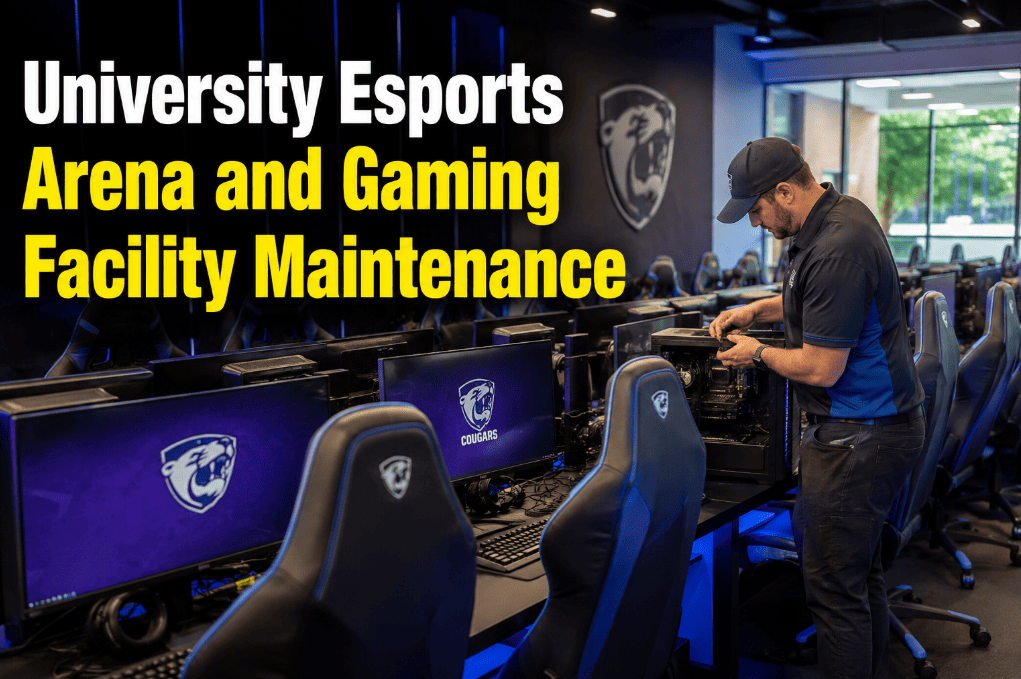
University Esports Arena and Gaming Facility Maintenance
Esports arenas combine data center-density IT cooling, broadcast-grade AV systems, and high-cycle peripheral assets into a facility that must perform at tournament standard every day. One unplanned failure during a streamed match is a reputational event, not just a maintenance incident.
An Esports Arena Is Not a Computer Lab — Its Maintenance Demands Are Different
Traditional campus IT and facilities teams are not equipped to manage the maintenance complexity of a high-performance esports arena. The HVAC runs harder, the network standards are tighter, the peripherals cycle faster, and the broadcast equipment has failure modes that a standard building inspection will never catch. Oxmaint creates a structured PM framework that covers every asset class in the facility — from GPU thermal management to broadcast switcher firmware cycles. See how tournament-ready maintenance is built — start a free trial or book a demo.
Eight Asset Categories That Define Esports Arena Maintenance
An esports arena is a layered facility — each asset category has different failure modes, different replacement cycles, and different consequences when it fails mid-tournament. Understanding these eight domains is the foundation of a functional esports facility PM program.
RTX 4080/4090-class workstations drawing 300–450W TDP per station. Thermal paste degradation, fan bearing wear, and dust accumulation in GPU heatsinks cause throttling at 18–24 months under daily high-load use. Unmonitored thermal drift reduces GPU clock speeds by 15–25% before hardware failure, visibly degrading competitive performance.
Managed switches, fiber patch panels, UPS units, and structured cabling delivering sub-1ms inter-station latency. Network PM includes switch firmware updates, SFP module inspection, patch panel port cleaning, and UPS battery health verification. A single failing SFP module introduces 3–7ms of latency jitter — detectable in competitive play and catastrophic during tournament matches.
CRAC units, variable air volume systems, supplemental spot coolers, and ceiling cassette units managing the thermal load of 60+ gaming PCs running at sustained full load. At 350W average per station, a 60-station arena generates 21kW of heat — equivalent to a small server room. Dirty coils and clogged filters reduce cooling capacity by 15–30%, causing GPU throttling before HVAC alarm thresholds are reached.
Production switchers (Blackmagic ATEM, Tricaster), capture cards, streaming encoders, PTZ cameras, LED walls, and audio mixing consoles. These assets run at sustained high loads during tournament events and have firmware dependencies that must be maintained current for platform compatibility. A broadcast switcher with outdated firmware can fail mid-stream when interfacing with new capture card drivers.
Gaming mice (rated 20–50 million clicks), mechanical keyboards (rated 50–100 million keystrokes), headsets, and monitors. Under 8 hours of daily competitive use, these components reach end-of-rated-life in 18–30 months. Peripheral failure mid-match is an immediate player substitution event in organized competition — and unscheduled replacements cost 40–60% more than bulk planned procurement.
Rackmount UPS units, PDUs, and surge protection protecting gaming workstations and broadcast equipment from power events. UPS batteries degrade to 80% rated capacity in 2–4 years and must be tested and replaced on schedule — a UPS that appears functional but cannot sustain 5 minutes of runtime will allow an unclean shutdown of 60 workstations during a campus power bump, corrupting game states and tournament match records.
1ms response gaming monitors (240Hz+), large-format LED display walls for spectator viewing, and projection systems for coaching review areas. Monitor backlights degrade over 10,000–15,000 hours of operation — in a facility running 8 hours daily, monitors reach 50% of rated backlight life in 3.4 years. LED wall panels require pixel-level inspection for dead pixel clusters that become visible at spectator viewing distances during live events.
Acoustic treatment panels, programmable RGB lighting systems, caster seating, commentary booth AV, and PA systems for spectator areas. Acoustic panels in high-traffic areas degrade from contact and require periodic re-mounting and replacement. Lighting control systems require firmware updates for new fixture compatibility — failed firmware updates have disabled entire arena lighting rigs during pre-tournament setup.
What Happens When Each System Fails During a Tournament
Tournament-Readiness Maintenance with Oxmaint
Oxmaint tracks every gaming workstation, network device, HVAC unit, broadcast asset, peripheral set, and UPS in the esports arena as an individually scheduled asset with its own PM interval, replacement forecast, and compliance record. Esports facilities ready to eliminate match-day failures can start a free trial or book a demo.
Each gaming workstation registered with GPU model, TDP rating, install date, and PM schedule — quarterly thermal paste inspection, dust clearing, and fan health check triggered by time and operating hours. Condition scores track thermal performance degradation before player-visible throttling occurs.
Managed switches tracked with firmware version, last update date, and quarterly inspection checklists covering port utilization, SFP module error counts, and UPS battery health — preventing the latency jitter events that trigger match disputes and tournament reviews.
Broadcast assets — switchers, encoders, PTZ cameras, and audio consoles — inspected against a pre-tournament checklist 48 hours before every scheduled match. Firmware versions verified for platform compatibility. Signal flow tested end-to-end. No broadcast failure surprises during a live-streamed event.
Peripheral assets tracked by station assignment, installation date, and usage intensity — with bulk replacement work orders generated at 18-month intervals. Planned procurement at 40–60% lower unit cost than emergency replacement, and zero mid-match peripheral failures from age-related defects.
HVAC PM intervals adjusted for esports arena cooling load density — monthly filter inspection instead of quarterly, coil cleaning every 90 days instead of annually. Cooling system PM scheduled around tournament calendar to avoid service windows that reduce cooling capacity on match days.
A single Oxmaint tournament-readiness work order triggers checklist tasks across all eight asset domains — workstation thermal status, network health, UPS runtime test, broadcast signal flow, peripheral condition, HVAC setpoint verification, display pixel check, and lighting control test — completed and signed off 48 hours before first match.
Esports Arena Asset PM Intervals
These intervals reflect the higher use intensity of esports facility assets versus standard campus equipment. A gaming workstation running 8 hours daily at full GPU load degrades faster than a lecture room PC — its PM schedule must reflect that difference.
| Asset / System | Maintenance Action | Standard Interval | Tournament-Season Interval | CMMS Trigger |
|---|---|---|---|---|
| Gaming Workstation | Thermal paste inspection, dust clearing, fan test | Quarterly | Monthly | Calendar + Hours |
| Gaming Workstation | Full thermal rebuild (paste, pads, heatsink reseat) | 18 months | 12 months | Time PM |
| Network Switches | Firmware review and SFP module error check | Quarterly | Monthly | Calendar PM |
| UPS Systems | Battery health test and runtime verification | Quarterly | Pre-tournament | Calendar + Event |
| UPS Battery Replacement | Full battery bank replacement | 3 years | 3 years | Time PM |
| HVAC / CRAC Units | Filter replacement and airflow check | Monthly | Monthly | Calendar PM |
| HVAC / CRAC Units | Coil cleaning and refrigerant inspection | Quarterly | Quarterly | Calendar PM |
| Broadcast Switcher / Encoder | Firmware audit and signal flow test | Quarterly | Pre-tournament (48 hrs) | Calendar + Event |
| Gaming Peripherals (mice, keyboards) | Condition audit and click/actuation test | Bi-annually | Pre-tournament | Time + Event |
| Gaming Peripherals | Bulk replacement cycle | 18–24 months | 18 months | Time PM |
| Gaming Monitors | Dead pixel scan and backlight uniformity check | Bi-annually | Pre-tournament | Time + Event |
| LED Wall Panels | Pixel-level inspection at spectator distance | Semi-annually | Pre-tournament | Time + Event |
Ad-Hoc Esports Facility Management vs. Structured PM with Oxmaint
What Structured Esports Facility PM Delivers
Pre-tournament 48-hour checklists across all eight asset domains catch every deficiency before first match — not during it
Planned bulk replacement at 18-month intervals versus same-day emergency procurement at full IT retail rates — 40–60% cost reduction per replacement cycle
Quarterly thermal maintenance prevents the 15–25% GPU clock reduction caused by heatsink buildup and thermal paste degradation under sustained gaming loads
Gaming workstations maintained with quarterly thermal PM average 5–6 years of competitive-grade service life versus 2–3 years without scheduled maintenance
Frequently Asked Questions
How often should gaming workstations in a university esports arena be serviced?+
What network infrastructure maintenance is required to maintain sub-1ms competitive gaming latency?+
How should universities manage gaming peripheral replacement cycles to minimize match-day failures?+
Can Oxmaint support the pre-tournament readiness process for university esports events?+
Your Esports Arena Runs at Tournament Standard Every Day. Its Maintenance Should Too.
Gaming workstations, low-latency networks, broadcast rigs, precision HVAC, UPS systems, and high-cycle peripherals — eight asset domains, eight different PM cadences, zero tolerance for match-day failure. Oxmaint brings all eight under one structured platform with pre-tournament readiness checklists, individual asset tracking, and lifecycle forecasting that prevents the failures that end matches and damage your program's reputation.



![university-custodial-workloading-appa-levels-issa-612-cmms-mobile[1]](./manage-post-2k26/uploads/university-custodial-workloading-appa-levels-issa-612-cmms-mobile[1].png)